Get your FileMaker scripts out of FileMaker, losslessly.
One copy turns trapped script XML into clean, readable text, ready for git, your editor, or AI tools of your choice. Convert a single step or whole scripts at once; one paste puts it back, losslessly. The bridge lives inside FileMaker, so there's nothing to install per editor.
Lossless, verified
Every step round-trips losslessly, identical the way FileMaker reads it by name, or the engine refuses and preserves it untouched. It never guesses.
214 step types
The full modern FileMaker set, current through FileMaker 2026: control flow, find, sort, scripting, and the new AI steps.
Runs on your machine
The conversion is local to FileMaker. Your scripts never leave your computer to be processed.
Copy out, edit anywhere, paste back
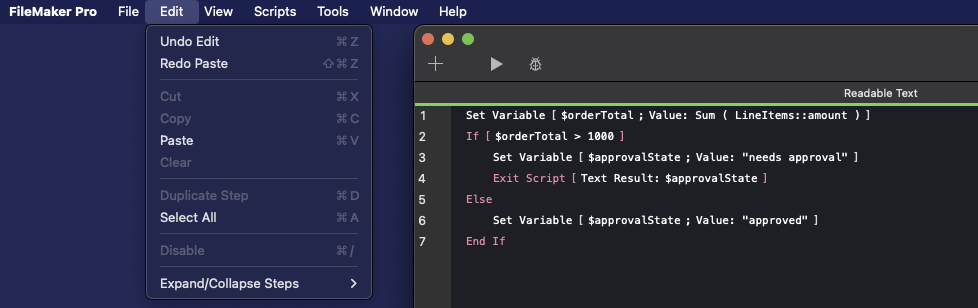
The whole loop on one real script. Copy the steps from FileMaker, work on them as plain text in any editor or AI, then paste them straight back.
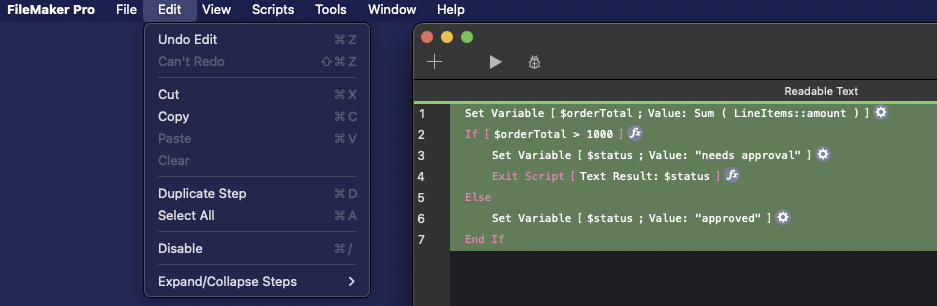
Set Variable [ $orderTotal ; Value: Sum ( LineItems::amount ) ]
If [ $orderTotal > 1000 ]
    Set Variable [ $status ; Value: "needs approval" ]
    Exit Script [ Result: $status ]
Else
    Set Variable [ $status ; Value: "approved" ]
End IfSet Variable [ $orderTotal ; Value: Sum ( LineItems::amount ) ]
If [ $orderTotal > 1000 ]
Set Variable [ $approvalState ; Value: "needs approval" ]
Exit Script [ Result: $approvalState ]
Else
Set Variable [ $approvalState ; Value: "approved" ]
End If
Renamed $status to
$approvalState in three places, with one
find and replace.
One script, everything handled
A real script with nested loops, a secret, a missing field, and a step the engine will not guess at. One pass, and every one of them is handled safely.
# Charge approved orders through the billing API
Set Variable [ $apiKey ; Value: "[redacted]" ]
Set Variable [ $endpoint ; Value: "https://api.billing.example/v1/charge" ]
Set Variable [ $sent ; Value: 0 ]
Loop
    Set Variable [ $retries ; Value: 0 ]
    Loop
        #! fmsb-missing-ref: Field "Orders::?" → Orders::<field-missing>
        Set Field [ Orders::<field-missing> ; "queued" ]
        Set Variable [ $retries ; Value: $retries + 1 ]
        Exit Loop If [ $retries > 3 ]
    End Loop
    Perform AppleScript  [ ## not-yet-pretty: preserved verbatim ## ]
    >>> preserved-fmxml
    <Step enable="True" id="67" name="Perform AppleScript"><Calculation>tell application "Finder" to activate ; delay 1</Calculation></Step>
    <<<
    Set Variable [ $sent ; Value: $sent + 1 ]
    Go to Record/Request/Page [ NoInteract: On ; RowPageLocation: Next ; Exit: On ]
End Loop
Exit Script [ Result: $sent ]
Secrets redacted
1×API keys, passwords and tokens are caught and replaced before the text ever leaves your machine.
Broken references flagged
1×A field, script or layout that will not resolve is surfaced, so a rename does not break silently on paste.
Never corrupted
1×A step it cannot perfectly convert is kept exactly as it was, in a preserved block, never guessed at.
Your scripts, finally unstuck
FileMaker scripts have been trapped behind the Script Workspace, with no diff, no git, and no easy way to hand them to an AI. Plain text changes that.
Refactor with an AI agent
Hand a whole script to Claude or your editor's AI as plain text, ask for the change, paste the result back. No retyping, no screenshots, no copy-by-hand.
Diff scripts in git
Commit the readable text and every change becomes a real line-by-line diff. Code review, blame, and history for logic that used to be invisible.
Review on a team
Send a teammate the text, not a screen-share. They read it in any editor, comment inline, and you paste the agreed version straight back into FileMaker.
Share with AI, safely
Redaction-assist flags API keys, passwords and emails before anything leaves your machine, and shows you a preview so you review before sending.
Untangle legacy scripts
Pull a sprawling 300-step script into text, search and restructure it with real tools, and catch broken field/script references before you paste it back.
You decide what the AI touches, and whether you need it
Control, not autopilot. AI is moving into FileMaker, and used well it's real leverage. But that leverage is yours to apply, not an agent's to take on its own. FMScriptBridge puts you at the gate: nothing leaves your solution unless you copy it out, and nothing changes unless you paste it back. Skip the AI entirely if you like; the tool works the same.
What goes out is your call
You copy out only the steps you want, as clean text. A step or a whole script, never the entire file by default, and never sent anywhere on its own. The conversion runs on your machine.
What comes back is your call
Review the AI's edits as plain text before they reach FileMaker. Secrets are redacted, broken references are flagged, and every step is verified lossless on the way back in.
How far you take it is your call
Read-only, a careful refactor, or full vibe coding. Same tool, your rules. It's up to you how you use it.
Modern AI, on your terms. You stay the developer in control.
Built to be trusted with your code
A tool that rewrites your scripts has to earn trust. Two of the guardrails, shown with real engine output:
Redaction-assist
2 value(s) flaggedBefore
Set Variable [ $apiKey ; Value: "sk_live_8fH2k9Lm4Qz7Wx1Tb6Yv3Rn0Pd5Sc" ]
Set Variable [ $endpoint ; Value: "https://api.billing.example/v1/charge" ]
Set Variable [ $notifyTo ; Value: "accounts@northwind-client.example" ]
If [ $orderTotal > 1000 ]
    Set Variable [ $authHeader ; Value: "Bearer " & $apiKey ]
End If
After, safe to share
Set Variable [ $apiKey ; Value: "[redacted]" ]
Set Variable [ $endpoint ; Value: "https://api.billing.example/v1/charge" ]
Set Variable [ $notifyTo ; Value: "[redacted]" ]
If [ $orderTotal > 1000 ]
    Set Variable [ $authHeader ; Value: "Bearer " & $apiKey ]
End If
You see the preview and decide. Redacted output is intentionally not paste-back safe. Restore the real values in FileMaker.
Broken-reference detection
2 flaggedFM → Text (copying out)
Set Variable [ $orderId ; Value: Orders::orderId ]
Set Field [ Orders::status ; "shipped" ]
#! fmsb-missing-ref: Field "Orders::?" → Orders::<field-missing>
Set Field [ Orders::<field-missing> ; $trackingNumber ]
#! fmsb-missing-ref: Script "?" → <unknown>
Perform Script [ "<unknown>" ; Parameter: $orderId ]
Text → FM (pasting back)
Set Variable [ $orderId ; Value: Orders::orderId ]
Set Field [ Orders::status ; "shipped" ]
#! fmsb-missing-ref: Field "Orders::trackingNumber" → Orders::<field-missing>
Set Field [ Orders::<field-missing> ; $trackingNumber ]
#! fmsb-missing-ref: Script "Notify Customer" → <unknown>
Perform Script [ "<unknown>" ; Parameter: $orderId ]
Coming out, the engine flags the references FileMaker already lost. Going back in, it shows what you meant next to what resolved, so a renamed field or a missing sub-script is caught before it pastes.
Runs on your machine
The conversion happens locally, inside FileMaker. Your scripts and data don't go to a server to be processed.
The tool sends nothing
No script content is uploaded. The only network traffic is an anonymous license check, never your code.
Redaction-assist, with preview
Flags secrets and PII before you share with an AI, and shows you exactly what changed so you review before sending.
Catches broken references
Surfaces fields, scripts and layouts that won't resolve, so a renamed field doesn't silently break on paste.
Yours to configure
Set your own shortcuts and trigger style, choose your redaction defaults, and decide what, if anything, ever leaves your machine. The plugin fits your workflow, not the reverse.
No telemetry
No analytics in the tool. If a step is too unusual to convert perfectly, you can opt in to send that one step, redacted, so coverage improves. You choose to send it, and you see exactly what is in it.
Because the bridge lives inside FileMaker, the text works everywhere. There's no extension to install for each editor, and it's clean enough that an AI assistant reads and rewrites it as easily as you do. Use whatever you already use.
- VS Code
- Cursor
- Antigravity
- Claude
- Zed
- Vim
- plain text
- your brain
From the developer
Victor Polyak
FileMaker developer, building this in the open
“I have built FileMaker solutions for the aviation industry since 2012, and I will admit to a useful kind of laziness: I do not like doing the same thing twice by hand, so I am always looking for ways to work faster and automate the tedious parts. Sometimes that means a sharper script, sometimes a whole new tool. Automation is not always the win it promises, though. Now and then the tool costs more to build than the chore it replaces, and part of the craft is knowing the difference. This is not one of those cases. I reach for it on nearly every script I touch, so the time it saves compounds fast, and getting my logic out as clean, readable text opened a door: git, real diffs, and modern AI assistants all expect plain text, and now my FileMaker logic can use them too. I build it in the open and dogfood it every day.”
Questions worth asking
Launching 2026 · Mac + Windows
FileMaker 2026 is adding AI. Do I still need this?
More than ever. In-product AI is powerful, but it can reach straight into your solution. FMScriptBridge keeps you at the gate: you copy out only the steps you want, edit them with any AI, and paste back only the changes you've reviewed, with secrets redacted, broken references flagged, and every step verified lossless. You get modern AI leverage without handing an agent open access to your code. It's up to you how you use it.
Will it round-trip without breaking my scripts?
That's the whole design. A step is only converted to clean text if the engine can reproduce it exactly; if it can't, it preserves the original XML untouched rather than guess. Equivalence is verified on FileMaker's own name-based canonical form before anything is handed back.
Can I use it with an AI like Claude, ChatGPT, or Copilot?
Yes. That's the whole point of clean, readable text: paste a converted script into any AI tool to explain, refactor, or document it, then convert the edited text back to paste-ready FileMaker. A redaction-assist pass flags secrets like API keys and passwords before anything leaves your machine.
Can it convert more than one script at a time?
Yes. It handles a single step, a whole script, or multiple scripts at once, including their folders and separators, so you can lift a whole chunk of a solution into text in one pass instead of step by step.
Do my scripts or data leave my machine?
No. The conversion runs locally inside FileMaker. No script content is uploaded. The only network traffic is an anonymous license check, and bug reports are opt-in and redacted.
Which FileMaker versions are supported?
Current through FileMaker 2026, including its new script steps. The catalog covers all 214 documented step types, and unknown steps are preserved rather than corrupted. It supports Mac and Windows.
The plan, without the marketing
No fluff. Here is exactly what you get, how the subscription works, and what happens if you stop paying.
Free, forever
no account gamesThe reader. Yours to keep.
- Read any script as clean, plain text (FileMaker to text)
- Full lossless fidelity. A step is never corrupted, only preserved if it cannot be prettified
- A basic secret-redaction floor, so sharing with an AI stays safe
Subscription
everything belowOne subscription buys the whole toolset as it grows, not a single download.
- Paste back into FileMaker (text to FileMaker). The full round trip
- Configurable secret and PII redaction, with a review preview
- Broken-reference detection before you paste
- Whole-script and comment handling, including multiple scripts with their folders and separators
- The command-line tool and the standalone app, when they ship
- Works with the AI tools you already use, like Claude, ChatGPT, or Cursor, with no extra setup
- Every new FileMaker release supported
- Priority support
How the subscription works
- One month free, full capability, no commitment.
- After that, an annual subscription that bundles everything in the Subscription column.
- Seat, developer, and server tiers, the way FileMaker tools usually license.
- Price is set at launch. Waitlist members lock founder pricing.
If you cancel or it lapses
- You keep the reader forever. FileMaker to text never goes away.
- You lose paste-back, the redaction preview, and broken-reference detection.
- Nothing you already converted is taken away from you.
You drop back to the free reader. You never lose the ability to read your own scripts.
Privacy
Plainly: what the tool touches, and what this website collects.
The tool
- The conversion runs on your machine, inside FileMaker. Your scripts and data never go to a server to be processed.
- The only network call from the tool is an anonymous license check.
- Bug reports are opt-in and redacted. You see exactly what is in them before anything sends.
- No analytics are built into the tool.
This website
- If you join the waitlist, we store your email address to tell you when it launches, and for nothing else.
- Your email is stored in our own database on Cloudflare, and the confirmation is sent with Resend, our email provider. It is never shared or sold.
- We use Cloudflare Web Analytics, which is cookieless and privacy-first: no tracking cookies, no cross-site profiles, and no personal data collected.
- We do not sell your data.
Questions about your data? Email info@fmscriptbridge.com.
Get your scripts out of FileMaker
Join the early-access list. We'll email you when FMScriptBridge is ready, with founder pricing for the people who showed up first.
No spam, one launch email. Mac + Windows, 2026.
Know another FileMaker dev who'd want this? Forward it →